What are profile layouts?
Profile layouts are different designs that you can apply to your profile page. The main purpose is to determine which layout should be used for your profile card, changing the arrangement of the various features within it.
With the different positions of Profile Views and the Audio Player, you can change more than just the card itself through the layout.
Set a Card Layout
Want to move away from the default centered card? That’s easy!
Go to the layout page, where you’ll be greeted at the top with three different layout options.
All of the layouts shown in the image are completely free and will remain free in the future.
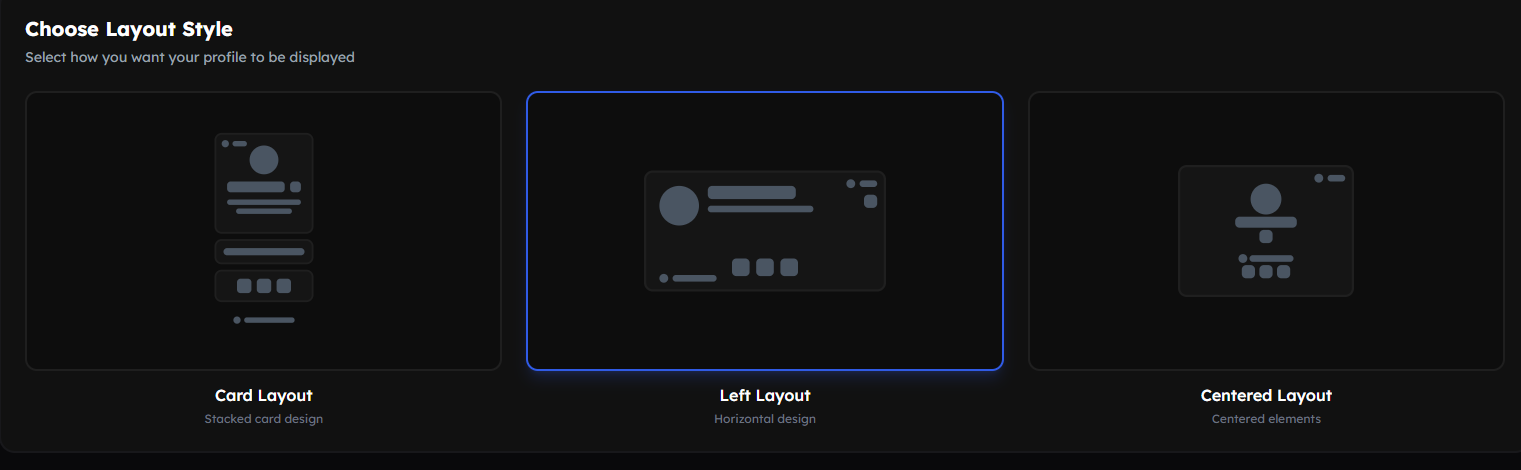 Layouts Available
Simply choose the layout you want to use and save your selection.
Change Audio Player & Profile Views Position
The positions of the Audio Player and Profile Views were mentioned earlier.
You can also set these to predefined positions. To do this, simply scroll down a bit on the layout page, and you’ll find the options there!
Profile Layout Integration Limits
Each profile layout has a maximum limit of integrations it can hold.
It’s important to note that Discord Presence also counts as an integration!
If you don’t know what integrations are, you can read the guide about them here!
| Layout | Maximum of Integrations |
|---|---|
| Centered Layout | 1 Integration |
| Left Layout | 4 Integrations |
| Card Layout | 1 Integration |